
images
  • Pricing
  • Demo
  • FAQ’s
  • Docs
  • Support
  • Login
Buy now

Orders and vouchers

Documentation

  • Getting started
    • Download the free version
    • Buy and download Gift Cards Pro
    • Install the plugin and activate the license
    • System requirements and compatibility
  • Plugin pages and shortcodes
    • Giftcard modern page
    • Giftcard standard page
    • Gift items page
    • PDF preview pages
    • Payment successful and cancelled pages
    • Check voucher balance page
  • Plugin settings
    • General settings
    • Payment settings
    • WooCommerce settings
    • Email settings
    • AI Backgrounds settings
  • Design templates and gift items
    • Giftcard modern templates
    • Create a template with the builder
    • Generate backgrounds with AI
    • AI credits
    • Giftcard standard templates
    • Gift items and packages
    • Categories
  • Display booking forms
  • Orders and vouchers
    • Manual orders
    • Email Center
  • Redeem vouchers
    • Via WooCommerce
    • In person
  • FAQ
  • Video guide
  • Changelog
  1. Home
  2. Docs
  3. Documentation
  4. Orders and vouchers

Orders and vouchers

Gift Cards Pro → Purchase History is the order desk. It lists every sold voucher with order ID, code, voucher details (template, value, recipient, expiry), buyer, payment status and date.
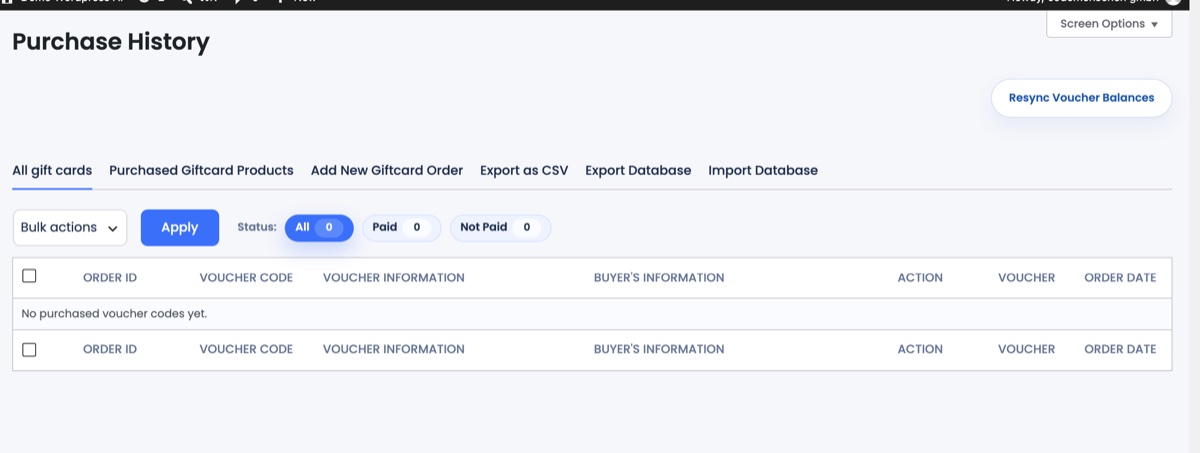
Purchase History with its tabs: All gift cards, Purchased Giftcard Products, Add New Giftcard Order, Export as CSV, Export/Import Database

Tabs

  • All gift cards: vouchers sold through the plugin forms; filter by Paid / Not paid, search by code or buyer.
  • Purchased Giftcard Products: vouchers sold as WooCommerce products.
  • Add New Giftcard Order: create a voucher by hand (see Manual orders).
  • Export as CSV, Export Database, Import Database: for accounting or moving to another site.

Actions per voucher

  • Mark as paid: for bank-transfer orders after the money arrived; the voucher becomes redeemable and the emails are sent.
  • Mark as used: after an in-person redemption.
  • Voucher / Receipt / Invoice: open or regenerate the PDFs; Resend the email.
  • View details: full amount, credit left, the orders the voucher was applied to and the total it generated.
  • Resync Voucher Balances: recalculates balances from the WooCommerce orders if they ever get out of step.

Articles

  • Manual orders
  • Email Center
Updated on August 29, 2026

Doc navigation

← Display booking formsRedeem vouchers →
images
    • Pricing
    • Demo
    • FAQ’s
    • Docs
    • Support
    • History
    • Blog